 Tr4wl
Tr4wlFinds the files Spotlight can't see.
A complete index of your home folder - dotfiles, caches, build folders, ~/Library, app containers, the inside of .app bundles - searched as fast as you can type.
14-day trial · macOS 14 Sonoma or later · $15.99 once, not a subscription
Why this exists
macOS never got an Everything.
On Windows, Everything answers before you finish typing, because NTFS keeps its own table of every file on the volume and Everything reads it directly. macOS has no such table. Spotlight indexes what is inside your files and was built to skip a great deal of your disk, so the reflex of typing three letters and getting the file has nowhere to go on a Mac. Tr4wl is the index that was missing.
It is not a port of Everything and it does not work the same way. With no table to read, Tr4wl walks the disk itself once and then follows changes as they happen. Everything also has years of features Tr4wl does not have yet - what is here is the part that mattered first, built properly, and the rest comes one piece at a time.
The difference
Your disk already knows. Nothing was asking it.
Most Mac search tools do their work when you ask: they walk the disk looking for your filename, so they see everything and you wait for it. The instant ones take the other route and read Spotlight's index, which means they inherit whatever Spotlight was told to skip.
Tr4wl indexes in advance. It builds its own index of your filenames once, keeps it current as the filesystem changes, and excludes nothing. Searching is then just looking something up. This is the approach Everything takes on Windows, which is where the idea came from.
| Way of doing it | Sees everything | Instant | What it costs you |
|---|---|---|---|
| Reading the Spotlight index | inherits its blind spots | ✓ | nothing extra |
| Scanning the disk each time | ✓ | you wait for it | nothing extra |
| Keeping its own index what Tr4wl does | ✓ | ✓ | memory - the index has to live somewhere |
These are three ways to build a search tool, not a scoreboard of products - plenty of good tools take the first two routes, and some can be configured to do more than one. The third route is the one with a running cost: the index sits in memory while the app is running. That is the trade Tr4wl makes, and it is the honest reason not to use it if you only search once in a while.
Searching a home folder of about 3 million files and folders for package.json - same Mac, same folder, same answer
Real time, not sped up. Both cold, both returning about 38,300 files. The scan is time find ~ -iname package.json - run it yourself.
Scanning tools differ less in speed than in what they leave out. A free one returned the same files only once we turned on invisible files, app bundle contents and full disk access; at its defaults it found 393 where everything-on found 6,103. Scanning itself isn't the worse idea - no index, no memory, never stale. Tr4wl pays 11 seconds and about 180MB once instead. One machine's numbers, not a benchmark.
Tr4wl also isn't meant to replace Spotlight. Spotlight reads your documents and knows what's in them. Tr4wl only knows names - but it knows all of them, including the ones Spotlight was told to skip.
Where it looks
The places your Mac quietly skips.
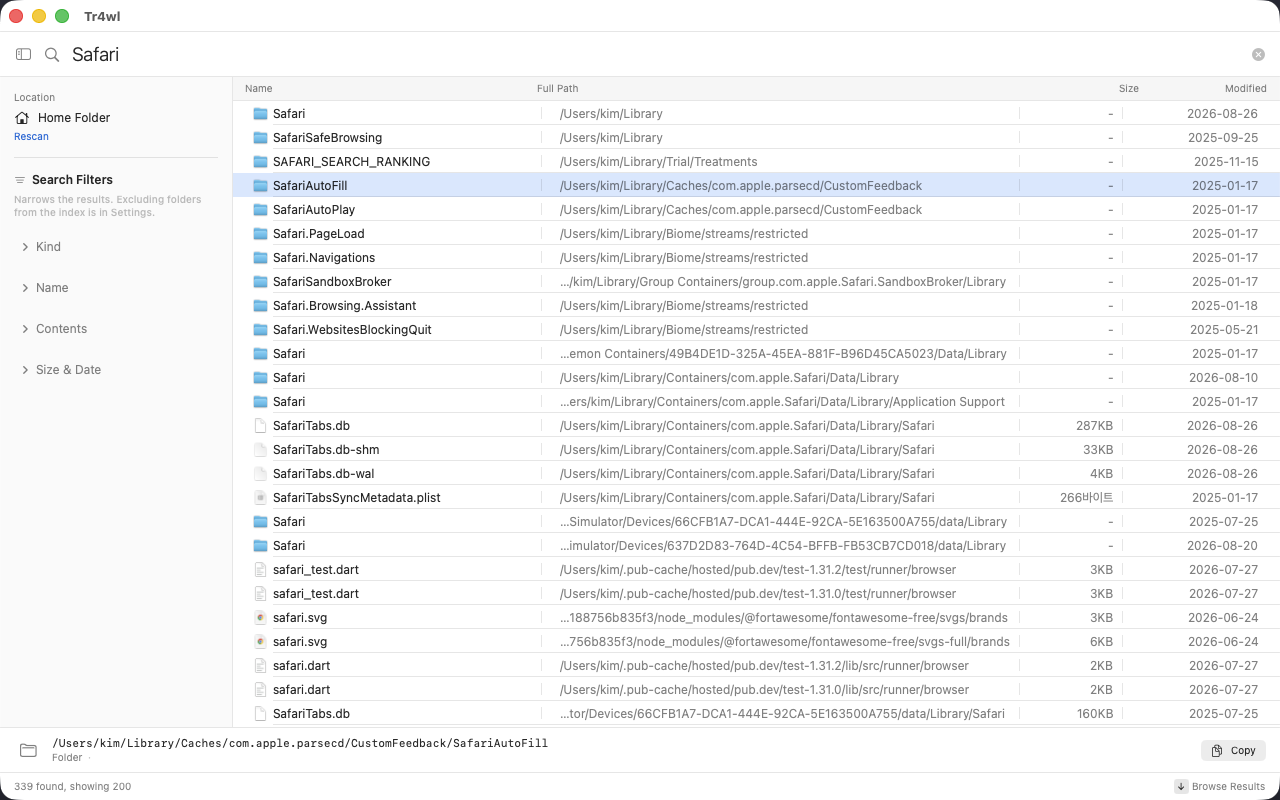
Spotlight leaves out a great deal of your own disk, and most search tools inherit those blind spots. Tr4wl excludes nothing - not even node_modules and the caches that make an index large.
- Dotfiles
- Caches
- Build folders
- ~/Library
- App containers
- Inside .app bundles
- External volumes
Directories it couldn't open on a full run: 0. That number is the whole point - an index with holes in it sends you back to Finder.
Examples
Things you can't currently find.
These are the searches that send people looking for another tool in the first place. Every one of them runs against the index, so the answer is already there when you finish typing.
Info.plist
Reaches inside .app bundles, where Finder
won't take you without Show Package Contents.
com.apple.Safari
Into ~/Library/Containers - the sandboxed
per-app folders that Spotlight will not index.
.env
Dotfiles. Invisible in Finder by default, and easy to leave behind in
an old project.
^IMG_\d{4}\.HEIC$
Regular expressions when a substring isn't precise enough.
regex
<swift|kotlin> !test
Booleans: | for or, !
for not, quotes for exact, < > to group.
Filename search is instant because it runs against the index. Searching inside files narrows by name first and then reads only the survivors - there's no content index to build or maintain.
What's in it
Small app. No ceremony.
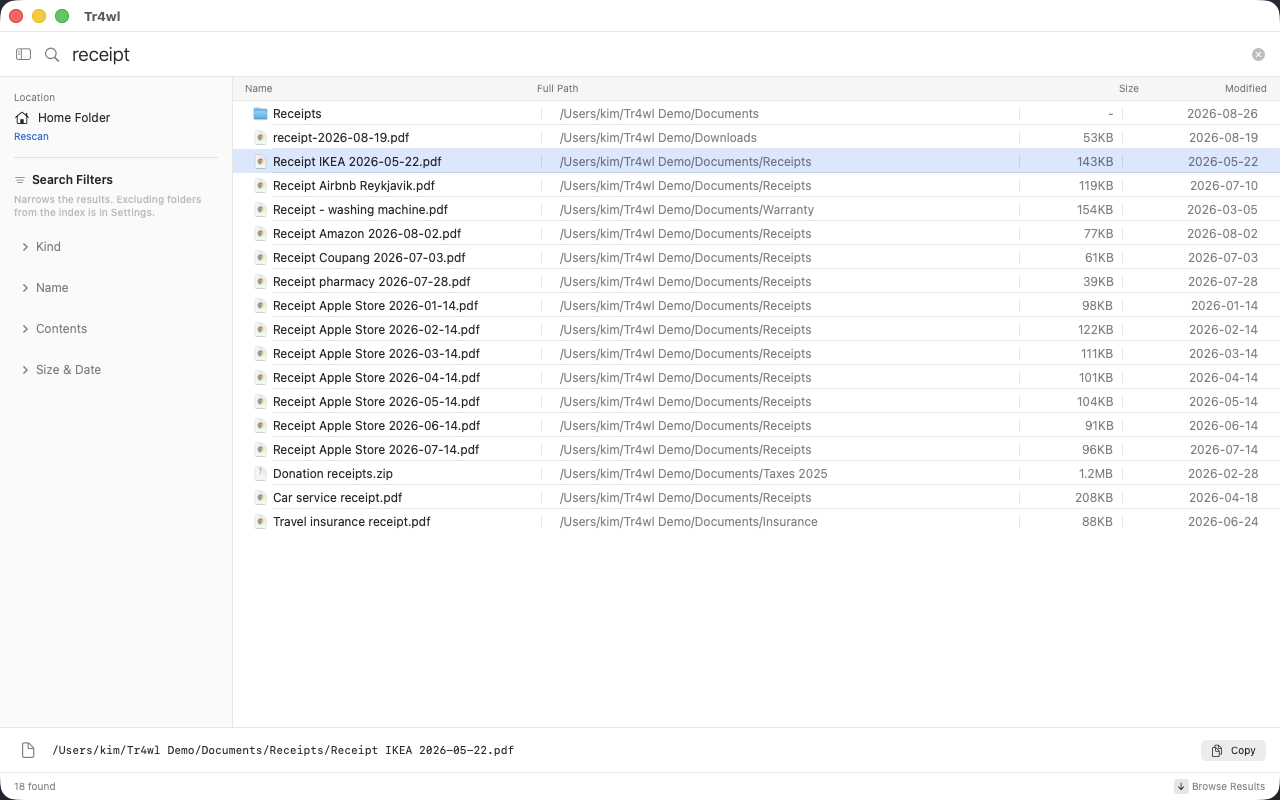
Substring search
Type any part of a name. Results narrow with every keystroke, with no wildcards to remember.
Regex & boolean
When you need it: |, !, quotes, grouping and full regular expressions.
Search inside files
Narrow by name, then look at contents. No content index, so nothing extra to maintain.
Live updates
The index follows the filesystem as it changes. Nothing to re-scan when you launch it.
Quick Look
⌘Y previews any result. Arrow keys walk the list while the preview stays open.
Saved searches
Keep the queries you run often. Filters for kind, size and date live in the sidebar.
Do things with results
Drag out, reveal in Finder, rename, move to Trash, export the list. No instant delete - nothing here is irreversible.
Global hotkey
Summon the window from anywhere. It stays running, so the index stays warm.
English & Korean
한국어를 지원합니다. Light, dark, or follow the system.
Nothing leaves your Mac
No analytics, no crash reporting, no update pings you didn't ask for. See below.
Full Disk Access
You're about to give an app the run of your disk.
So it's fair to ask what it does with that. Tr4wl needs Full Disk Access because that is the only way macOS will let anything read ~/Library and other apps' containers. Here is the whole of what it does with the permission.
| Reads filenames, sizes and dates | ✓ |
| Reads file contents | only for the files you explicitly run a content search over |
| Sends anything anywhere | Never |
| Analytics, telemetry, crash reports | None |
| Network use | licence activation, an occasional licence re-check, and update checks - nothing else |
| What those requests contain | your licence key and activation id. No file names, ever. |
The index is a single file in the app's own folder, excluded from Time Machine. Delete the app and it goes with it. An app that reads your whole disk has no business also talking to the internet, so it doesn't.
Pricing
Pay once. Keep it forever.
- Two Macs per licence - your laptop and your desk.
- 14-day trial. Every feature. No nag screens, no crippled results.
- 15-day refund. No questions asked.
- Free updates for the whole 1.x line.
- No accounts, no analytics, no telemetry. Nothing about your files ever leaves your Mac.
Paid and receipted by Polar, who handle the sale on our behalf · 15-day refund, no questions asked · your key appears the moment the payment clears.
If this ever shuts down, a final build with the licence check removed will be published. Your copy keeps working either way - the app is local, and so is its licence.
After you buy
- Your key appears on the confirmation page the moment the payment clears, and it stays in your customer portal for good. The receipt is sent by Polar, who handle the sale on our behalf - so don't go looking for our name in your inbox.
- Download and drag Tr4wl into your Applications folder. The download sits on that same confirmation page, so there's no need to come back here for it.
- Activate. Press ⌘,, open Licence, paste the key, click Activate. One key covers two Macs, and you can move it between them.
First launch asks for Full Disk Access - that's what lets Tr4wl look where ordinary search won't. The manual walks you through it in about a minute. Anything wrong, write to us.
Questions
Reasonable objections.
How is this different from Spotlight?
Spotlight indexes the contents of documents, but it is told to skip large parts of your disk - ~/Library, app containers, caches, anything inside a .app, and everything a developer generates. Tr4wl indexes filenames only, but it indexes all of them.
They're complementary. Spotlight is better at "the invoice that mentions a client name." Tr4wl is better at "where on earth is that config file."
Why not just scan the disk when I need to?
That is a perfectly correct way to search, and it is complete. It is also slow every single time. The cost is in asking the kernel about every directory on the way, so running the same scan again doesn't get you much - it isn't the disk being cold, it's the work itself. An index moves that work to once, in the background, instead of every time you type.
If you only search occasionally, scanning is the better trade: nothing sits in memory. Tr4wl is for people who search often enough that the wait adds up.
Doesn't an index of every filename eat memory?
It is the honest cost of the approach, and it is smaller than you would guess: on a home folder of a few million files, roughly a tenth of a gigabyte. Filenames are interned, so a name that appears ten thousand times is stored once. There is no database - the index lives in memory, is written out when you quit, and is memory-mapped back on launch, which is why it is searchable straight away instead of re-scanning.
Does the index go stale?
No. It follows the filesystem through FSEvents, so a file you save is findable immediately, with a full re-check once a day as a safety net. There is no scheduled refresh to configure and no re-scan when you launch.
Why isn't it on the Mac App Store?
Because the sandbox the App Store requires would block exactly the folders this app exists to search - other apps' containers and the parts of ~/Library that macOS protects. A sandboxed build would be blind in the same places Spotlight is, which would make it pointless.
Network volumes, NAS, Time Machine?
Not supported, on purpose. Indexing and change-watching both fail on network volumes, and Time Machine would multiply the index by every snapshot. You can add a network volume anyway and Tr4wl will warn you rather than pretend.
Intel Macs? Older macOS?
macOS 14 Sonoma or later, Apple silicon only for now.
Tr4wl reads directory entries straight out of the kernel and walks the returned buffer by hand - that is what makes it fast, and it is also the kind of code that can behave differently on another architecture. Rather than ship an Intel build nobody has ever run, 1.0 is Apple silicon only. If you want it on an Intel Mac, say so and it goes on the list.
Stop waiting on your own disk.
Download Tr4wl 1.0macOS 14 Sonoma or later·Apple silicon
Needs Full Disk Access to see everything.
Tr4wl explains how on first launch.